|
SET UP «
Windows XP | Windows
2000 | Windows NT
| Windows 98/95 |
Windows ME | Mac OS8.X
| Mac OS7.X
|
• Create a dial-up connection to PacInfo
• Configure my PacInfo Internet settings
• Configure my PacInfo mail account |
| How to create a
dial up connection to PacInfo on Windows ME: |
| 1. From the Start
menu, click Settings, and choose Dial-Up Networking.
|
 |
| 2. Double-click the
Make New Connection icon. |
 |
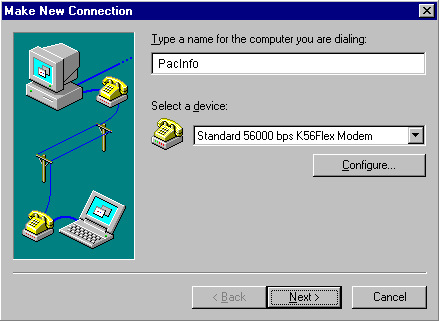
| 3. In the Type a name
for the computer you are dialing field, type PacInfo.
|
| 4. Click the down
arrow on the Select a device drop-down list and
choose your default modem. |
| 5. Click the Next
button. |
 |
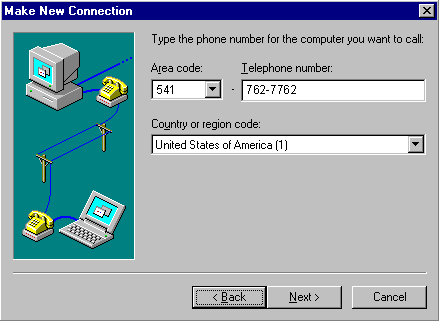
| 6. In the Area code
field, type in your local area code. |
| 7. In the Telephone
number field, type the PacInfo access number (541-762-7762).
|
| 8. Click the Next
button. |
 |
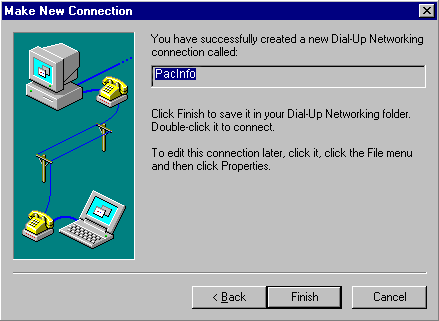
| 9. Click the Finish
button. |
 |
| 10. Click the PacInfo
icon with your right mouse button, then choose Properties.
|
 |
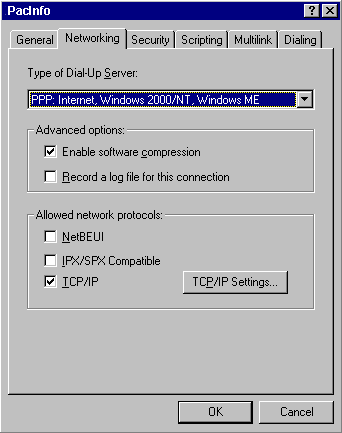
| 11. Click on the Networking
tab. |
| 12. Click the down
arrow on the Type of Dial-Up Server: drop-down list
and choose PPP: Internet, Windows 2000/NT, Windows
Me. |
| 13. Uncheck all the
boxes except for Enable software compression and
TCP/IP. |
| 14. Click the TCP/IP
Settings... button. |
 |
| 15. Make sure Server
assigned IP address and Server assigned name server
addresses are checked. |
| 16. Click the OK button.
|
 |
| 17. Click on the Security
tab. |
| 18. In the User name
field, type in your PacInfo user name (i.e. the
text preceeding the '@' symbol in your e-mail address).
|
| 19. In the Password
field, type in your password. |
| 20. Click the OK button.
|
 |










 Faq
Faq